
Getting started
If you're new to Blink, begin by downloading the Blink app and creating your account. Once you have completed these steps, you can proceed with setting up your Mini Pan-Tilt 2K+.
Setting up your Mini Pan-Tilt 2K+
- From the Home Screen, tap the + icon in the upper-right corner.
- Tap Pan-Tilt Cameras, then select Mini Pan-Tilt 2K+.
- Scan the QR code on the back of the device or tap Enter Serial Manually, then tap Continue. Once the serial number is recognised, select an available system to add your Mini Pan-Tilt 2K+ and tap Continue.
- If no systems are available or if none exist, create a new one with a unique name. Learn more about creating and managing systems.
- Plug in your Mini Pan-Tilt 2K+ using the included USB-C cable and power adaptor. Place the camera on a flat, open surface with nothing around it. The camera will begin moving to self-calibrate. Do not touch or obstruct the camera until the movement stops. It is normal for the camera to make motor sounds when it stops. When ready, tap Continue.
- Note: Use the included cable and power adaptor. Third-party cables or adaptors may not provide sufficient power. For outdoor use, a Weather Resistant Power Adaptor is required, which is included in the outdoor bundle or available to purchase separately.
- Wait until the light on the camera starts flashing, then tap Connect To Wi-Fi. The flashing can take up to 10 seconds to begin. If the light does not start flashing, press and hold the reset button on the top of the camera for 15 seconds, or until the light starts flashing.
- You will be prompted to join the temporary Wi-Fi network 'BLINK-xxxx' (where 'xxxx' is the last four digits of your camera's serial number). Tap Join.
- From the list of available Wi-Fi networks, select your local Wi-Fi network. Enter the Wi-Fi password and tap Join. If your network does not appear, tap Refresh List. After joining, the camera may perform a firmware update, which can take a few moments.
- Note: You will have the option to securely save your Wi-Fi password to your Blink account for convenient access later. You can update or delete saved passwords by visiting Settings > Account & Privacy > Saved Passwords.
- Choose a name for your camera from the available options, or select Custom... to enter your own. You can change the camera name at any time in Device Settings.
- Choose a location for your camera. For best results, place it within Wi-Fi range, near a power source, up to 3 m (10 ft) high, aimed at the target area, and out of direct sunlight. When your camera is in place, tap Camera Is Installed. For mounting help, tap Mounting Instructions in the app or refer to the mounting section below.
If you experience any issues during setup, visit Mini Pan-Tilt 2K+ Troubleshooting.
Mounting your Mini Pan-Tilt 2K+
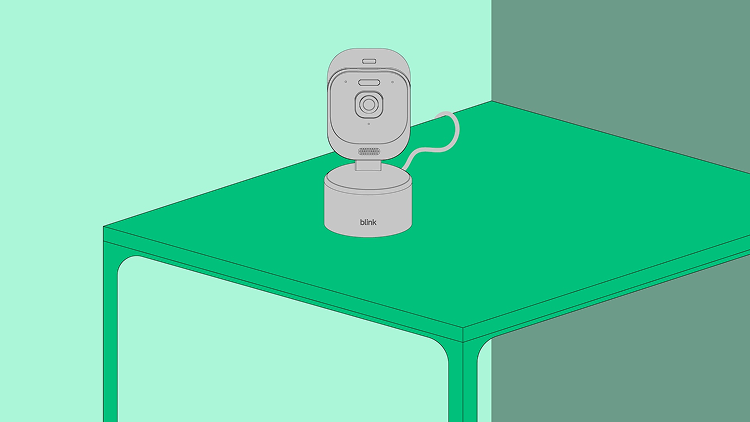
On a table or shelf
Place the camera on a flat, stable surface with enough clearance for the full range of pan and tilt motion. Avoid placing the camera near the edge of a surface where vibrations from the motor could cause it to shift.
On a wall
Before mounting, determine your surface type.
For soft surfaces (wood, plasterboard):
- Position the mounting plate on the wall where you want to install the camera. Secure it with the included screws. Choose a spot at least 10 cm (~4 inches) from the ceiling or any wall corner to avoid obstacles, so the camera can move around freely.

- Attach the wall-mount bracket to the mounting plate. Run the power cable up through the hole in the shorter side of the bracket.

- Slide the camera onto the wall-mount bracket. Slide it forward gently until you feel a click. Test gently to make sure it is locked in place.

- Plug in your Mini Pan-Tilt 2K+ and wait 30 seconds for it to turn on. If the camera is mounted upside down, go to Device Settings > Video and Photo Settings > Flip Video to ensure you see video the right way up. For outdoor installation, a Weather Resistant Power Adaptor is required, which is included in the outdoor bundle or available to purchase separately.

For hard surfaces (brick, masonry):
- Position the mounting plate on the wall and mark the screw hole locations with a pencil. Choose a spot at least 10 cm (~4 inches) from the ceiling or any wall corner to avoid obstacles, so the camera can move around freely. Whilst marking, make sure the arrow on the plate points up.

- Pre-drill your marked holes with a 5 mm (3/16") masonry drill bit. Then, push the included wall plugs into the holes.

- Secure the mounting plate to the wall with the screws included with the wall plugs.

- Attach the wall-mount bracket to the mounting plate. Run the power cable up through the hole in the shorter side of the bracket.

- Slide the camera onto the wall-mount bracket. Slide it forward gently until you feel a click. Test gently to make sure it is locked in place.

- Plug in your Mini Pan-Tilt 2K+ and wait 30 seconds for it to turn on. If the camera is mounted upside down, go to Device Settings > Video and Photo Settings > Flip Video to ensure you see video the right way up. For outdoor installation, a Weather Resistant Power Adaptor is required, which is included in the outdoor bundle or available to purchase separately.

On a ceiling
Before mounting, determine your surface type.
For soft surfaces (wood, plasterboard):
- Install the mounting plate on the ceiling. Secure it with the screws included with the wall plugs.

- Slide the camera onto the mounting plate until you feel a click. Once it is on, test to make sure it feels secure.

- Plug in your Mini Pan-Tilt 2K+ and wait 30 seconds for it to turn on. Since the camera is now mounted upside down, be sure to turn on the Flip Video option to ensure you see video the right way up. Go to Device Settings > Video and Photo Settings > Flip Video. For outdoor installation, a Weather Resistant Power Adaptor is required, which is included in the outdoor bundle or available to purchase separately.

- Using the included cable clips, secure the cable at the corner where the ceiling meets the wall. This keeps the cable out of the way so the camera can move freely.

For hard surfaces (brick, masonry):
- Position the mounting plate on the ceiling and mark the screw hole locations with a pencil.

- Pre-drill your marked holes with a 6 mm (1/4") masonry drill bit. Then, push the included wall plugs into the holes.

- Install the mounting plate on the ceiling. Secure it with the screws included with the wall plugs.

- Slide the camera onto the mounting plate until you feel a click. Once it is on, test to make sure it feels secure.

- Plug in your Mini Pan-Tilt 2K+ and wait 30 seconds for it to turn on. Since the camera is now mounted upside down, be sure to turn on the Flip Video option to ensure you see video the right way up. Go to Device Settings > Video and Photo Settings > Flip Video. For outdoor installation, a Weather Resistant Power Adaptor is required, which is included in the outdoor bundle or available to purchase separately.

- Using the included cable clips, secure the cable at the corner where the ceiling meets the wall. This keeps the cable out of the way so the camera can move freely.
