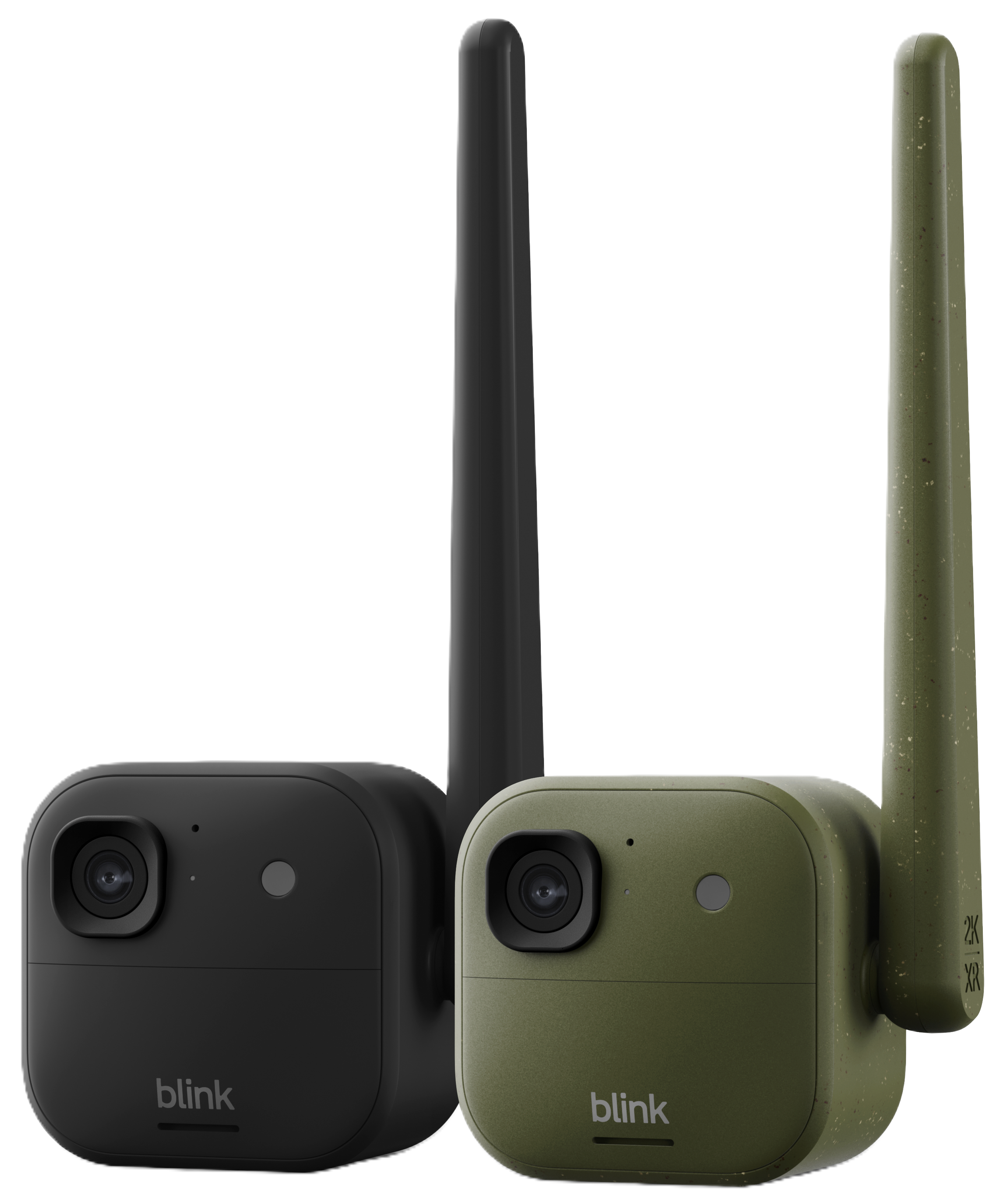
The Blink Frontier XR+ is an outdoor smart camera designed for extended-range monitoring. When paired with the Blink Sync Module XR or XR+ (sold separately or as part of a bundle), it delivers real-time motion alerts and live view at extended distances. It's ideal for monitoring gates, barns, outbuildings, and remote property boundaries that standard Wi-Fi cameras can't reach.
Certain features require a Blink subscription plan (sold separately).
Overview
What makes Frontier XR+ different from other Blink cameras?
Frontier XR+ is specifically designed for extended-range monitoring. Its external antenna maximizes signal strength when paired with the Sync Module XR or XR+. With an outdoor-mounted Sync Module XR+, it can reach up to 800 feet through heavy obstruction (for example, heavily wooded terrain with no line of sight) and up to 7,000 feet with a clear line of sight (open air, no obstruction between the sync module and the camera).
DeleteHow is Frontier XR+ sold?
Frontier XR+ is available as a standalone add-on camera or as part of a system bundle that includes the Sync Module XR+. The standalone camera is designed for customers who already own a compatible Blink Sync Module and want to expand their system. System bundles include the Sync Module XR+ along with a power adapter and cable, giving you everything you need to get started right out of the box.
Both the standalone camera and system bundles are available in Black and Army Green in the United States, Canada, and Australia/New Zealand.
DeleteAre there any cellular fees?
No cellular contract is required. Frontier XR+ connects through a compatible Sync Module over Wi-Fi, so there are no cellular fees or contracts. The Sync Module XR+ does require AC power and a Wi-Fi network, so the system is not designed for locations without power or internet access.
Each Sync Module XR+ supports up to 16 devices, and you can add unlimited systems per Blink account, all managed from the Blink app with one optional subscription. Certain premium features require a Blink subscription plan (sold separately), but basic connectivity does not.
DeleteHow far can Frontier XR+ reach?
Frontier XR+ can reach up to 800 feet through heavy obstruction (for example, heavily wooded terrain with no line of sight between the sync module and the camera) and up to 7,000 feet with a clear line of sight (open air, no obstruction between the sync module and the camera). Both ranges require an outdoor-mounted Sync Module XR+.(outdoor mounting kit sold separately). Actual range depends on the level of obstruction between the sync module and camera; trees, structures, terrain, and signal interference all reduce range. Range can be lower than 800 feet where heavy building materials such as brick or concrete sit between the sync module and the camera.
Note: Frontier XR+ has several extended range modes that affect video resolution. XR+ mode delivers the longest range and caps video resolution at 1080p. XR mode supports up to 2K video. Maximum range is achieved in XR+ mode. Two-way audio is not available in XR+ mode. Performance and connectivity may vary due to exterior walls, environment, or other factors.
DeleteSetup & installation
What's in the box?
Standalone (Add-on Camera):
If you purchased the Frontier XR+ as a standalone add-on camera, your box includes:
- 1 Frontier XR+ camera
- 1 Mount
- 1 Mounting kit
- 1 Angle adapter tool (for removing camera cover)
- 4 Energizer Ultimate Lithium AA 1.5V batteries (non-rechargeable)
- 1 Quick Start Guide
A compatible Blink Sync Module is required and sold separately. For extended range functionality, you'll need a Sync Module XR or XR+
System Bundle (Camera + Sync Module XR+):
If you purchased a Frontier XR+ system bundle, your box includes everything in the standalone package plus:
- 1 Sync Module XR+
- 1 power adapter
- 1 power cable
Multi-camera bundles include additional cameras with their own mounting kits and batteries.
DeleteHow do I mount Frontier XR+?
Frontier XR+ comes with a mounting kit designed for fast, hassle-free installation. It can also stand freely on a flat surface. For tree or pole mounting, a compatible strap mount accessory is available separately.
DeleteDo I need a Blink Sync Module?
Yes, Frontier XR+ requires a Blink Sync Module to operate. If you purchased a Frontier XR+ system bundle, the Sync Module XR+ is already included. If you purchased the standalone add-on camera, you'll need a compatible Sync Module (sold separately). To use the Extended Range feature, you'll need the Sync Module XR or XR+. Frontier XR+ is also backward compatible with all Blink Sync Modules for standard Wi-Fi connectivity (without extended range).
Note: Sync Module XR+ is compatible with all Blink devices, however extended range (XR) functionality is only supported for Outdoor 4, Outdoor 4 Floodlight, Outdoor 2K XR+, and Frontier XR+ cameras (range extension varies by camera). For outdoor use of the Sync Module XR+, a Blink Weather-Resistant Power Adapter is required (sold separately). For maximum extended range performance, the Sync Module XR+ should be mounted outdoors (outdoor mounting kit sold separately).
DeleteIs Wi-Fi required for use?
The Sync Module XR or XR+ requires a 2.4 GHz Wi-Fi connection to your router. The camera itself communicates with the Sync Module via the extended range protocol, so it does not need to be within standard Wi-Fi range.
Note: The camera does support 2.4 GHz Wi-Fi if you prefer a direct connection for closer placements.
DeleteCan Frontier XR+ be added to my existing Blink system?
Yes, Frontier XR+ can be added to your existing Blink system and is compatible with all Blink Sync Modules. However, Extended Range functionality requires the Blink Sync Module XR or XR+.
DeletePower & battery
Are batteries required for use?
Yes, Frontier XR+ is powered by four AA lithium batteries (1.5V, non-rechargeable). Energizer Ultimate Lithium AA batteries are recommended for optimal performance.
DeleteHow long do batteries last?
Frontier XR+ is powered by four AA lithium batteries and is designed for long-lasting performance with default settings (1080p resolution, battery efficiency mode). Actual battery life will vary based on factors such as frequency of motion triggers, extended live view sessions, extreme temperatures, weak signal connectivity, and higher resolution settings (2K).
DeleteCan I power Frontier XR+ externally instead of using batteries?
Yes. Frontier XR+ has a USB-C port that accepts 5V DC power input, so you can keep it powered continuously without worrying about battery replacement. It works with most standard USB-C cables and power supplies, or you can use the Blink Weather-Resistant Power Adapter for continuous outdoor power (sold separately).
DeleteVideo & camera features
What are the XR and XR+ extended range modes?
Frontier XR+ has multiple connectivity modes that extend its range beyond standard Wi-Fi. These modes allow the camera to communicate with the Sync Module XR+ at greater distances, but video resolution is adjusted to maintain reliable connectivity.
- Standard mode: Full 2K resolution (2560 x 1440) when the camera is placed closer to the Sync Module.
- XR mode: Video resolution supports up to 2K (2560 x 1440).
- XR+ mode: Video resolution is capped at 1080p (1920 x 1080). Two-way audio is not available in this mode. XR+ mode delivers the longest range.
The camera may recommend a lower resolution setting based on the distance and signal conditions between your camera and Sync Module. Maximum range is achieved in XR+ mode.
DeleteHow does Frontier XR+ perform in low light?
Frontier XR+ has infrared night vision that illuminates up to 33 feet (10 meters) from the camera. It also supports color low-light imaging in dimly lit conditions. You can set night vision to Auto, On, or Off, and adjust the infrared intensity to Low, Medium, or High in the app.
Note: Ambient light is required for Night Vision. If there is insufficient light, the camera may default to infrared (black and white) mode.
DeleteIs motion detection supported?
Yes. Frontier XR+ uses dual motion sensors combined with on-device smart detection to identify specific types of motion, including Person, Vehicle, and Animal Detection (requires Blink Plan). Once armed, the camera detects motion up to 33 feet (10 m) away and sends alerts to your phone. You can adjust detection settings and set up motion detection zones using a basic (8x8) or advanced (16x16) grid overlay in the Blink app. To learn more, visit Using Smart Detection Features.
Motion clips can be stored via cloud storage (requires Blink Plan) or locally using a Sync Module 2 with an USB or XR or XR+ with MicroSD card (sold separately). For more information, visit Blink Storage Options.
DeleteWhat types of smart detection are supported?
With an active Blink Basic or Plus plan (sold separately), Frontier XR+ can detect specific types of motion including Person Detection and Vehicle Detection, and send you a notification for each type. With a Basic ai or Plus ai plan, Blink Video Descriptions (BVD) is also available.
DeleteDoes Frontier XR+ support photo capture?
Yes, Frontier XR+ supports automatic photo capture. The camera can take a snapshot photo periodically (up to one photo per hour) to provide a visual timeline of activity at your camera's location. Photos are compiled into a clip list for easy review in the Blink app.
DeleteDoes Frontier XR+ include a temperature sensor?
Yes. Frontier XR+ includes a built-in temperature sensor that can send alerts when temperatures exceed set thresholds.
DeleteStorage & subscriptions
What subscription options are available?
Frontier XR+ includes a 30-day trial of Plus ai at no cost in the US (except IL), CA, and UK. The trial begins as soon as you activate your Blink product and includes ai-powered features for all your Blink devices. Afterward, choose between Basic, Plus, Basic ai, or Plus ai plans for cloud storage and premium features. The trial is not available for accounts with an existing Plus subscription, which already covers your devices.
Important: Due to state-specific legislation, Illinois customers will receive a Plus plan trial instead of Plus ai. Choose to subscribe on a monthly or annual basis.
What's included in the no-cost trial?
The no-cost trial provides the following features for all Blink devices on your account: cloud storage for unlimited video clips, Person Detection, Vehicle Detection, Photo Capture, extended clip storage (60 days in the US, CA, EU, and UK), and Blink Video Descriptions available in the US, CA, and UK only with a Basic ai, Plus ai, or no-cost trial plan.
If you're already a Plus plan subscriber, your existing plan automatically covers your devices rather than a trial being applied.
What video storage options are available?
Frontier XR+ can use either cloud or local storage. With a Blink Subscription Plan, clips are stored in the cloud on Blink's secure servers and can be viewed in the Blink app. For local storage, you can use a Sync Module 2 with USB flash drive or a Sync Module XR or XR+ with MicroSD card (all separately) and view clips in the Blink app.
For more information regarding video storage, visit Blink Storage Options.
DeleteAccessories & compatibility
What accessories can I use?
Frontier XR+ is compatible with the Strap Mount for tree or pole mounting, and the Blink Weather-Resistant Power Adapter for continuous outdoor power (all sold separately).
Note: For outdoor use of the Sync Module XR+, the Blink Weather-Resistant Power Adapter is required.
DeleteIs Frontier XR+ weather-resistant?
Yes, Frontier XR+ features a weather-resistant IP65 design made for the rain, dust, and severe weather. It can be mounted to a variety of outdoor surfaces and operates in temperatures from -5°F to 113°F (-20°C to 45°C) with UV-resistant materials for long-term outdoor durability.
Note: For outdoor use of the Sync Module XR+, the Blink Weather-Resistant Power Adapter is required.
DeleteIs Frontier XR+ compatible with Alexa?
Yes, go hands-free with a compatible Alexa device by linking your Blink and Alexa accounts. Features include streaming live video on Echo Show devices, arming and disarming your camera with voice commands, and setting helpful Alexa Routines to automate your security. To learn more, visit Alexa Supported Features.
DeleteWhat other smart home integrations are supported?
Besides Alexa, Frontier XR+ also integrates with IFTTT and Siri Shortcuts. IFTTT lets you automate tasks (for example, activate smart lights on motion detection) using If This Then That. To learn more, visit How To Use IFTTT Applets With Blink Systems. Siri Shortcuts lets you quickly view thumbnails, snooze cameras, or create location-based automations. To learn more, visit Siri Shortcuts and Automations.
DeleteDoes Frontier XR+ support two-way audio?
Yes. You can listen and talk through the camera using the Blink app (tap-to-talk). The microphone picks up audio clearly up to about 10 feet away, and the speaker volume is adjustable.
Note: Two-way talk is not available when the camera is operating in XR+ mode.
Troubleshooting & support
What should I do if my camera has connectivity issues?
If you experience connectivity issues with Frontier XR+, try the following steps:
- Ensure your Blink app is updated to version 49 or later.
- Confirm your Sync Module is powered on and connected to your Wi-Fi network.
- Check that the camera is within range of the Sync Module. If applicable, consider switching from XR+ mode to XR mode or Standard mode to improve signal quality.
- Restart the camera by removing and reinserting the batteries.
- Restart the Sync Module by unplugging and reconnecting the power adapter.
- Check for obstacles between the camera and Sync Module that could interfere with the signal (e.g., metal structures, thick walls, dense foliage).
Where can I find additional help?
Visit the Blink Support site for:
- Detailed setup guides
- Troubleshooting articles
- System requirements
- Technical specifications
Need more assistance? Contact Blink Support for help with your device.
Delete